My entire strategy is to do the work only I can do.
Work that can’t be taught. Work that requires some unique combination of my skills, opinions, tastes, and experiences. Work that without me, wouldn’t get done.
Everyone’s talking about AI replacing jobs, automating work, making developers obsolete. The discourse is exhausting. Half the people are panicking, the other half are in denial, and nobody seems to be asking the right question.
The question isn’t whether AI can write code. It can. The question is whether AI can do your work.
If your work is following established patterns, implementing well-understood solutions, or translating requirements into predictable outputs. Yes, that’s going to get automated. It should get automated. That’s not a threat, it’s just what happens when something becomes routine.
But the work that sits at the intersection of your specific experiences, your particular way of seeing problems, your accumulated context, the opinions you’ve formed from making mistakes, that’s different. That’s the work that moves things forward in ways that weren’t possible before you showed up.
AI can generate code. It can’t decide what’s worth building. It can’t know which shortcuts are smart and which ones will haunt you. It can’t weigh trade-offs through the lens of having seen this exact thing blow up before. It can’t have taste.
The hard part isn’t identifying this work. The hard part is being honest about whether you’re actually doing it. The hard part is saying no to everything else. The hard part is resisting the pull to stay busy with work that feels productive but could be done by anyone, or anything, with the same instructions.
I’m not always good at this. I still catch myself doing work that doesn’t need me. But when I do manage to focus on the work only I can do, everything else gets clearer. The decisions get easier. The direction becomes obvious.
Because if you’re not doing the work only you can do, what exactly are you doing?
Last year I wrote about hitting 130 hours of working out. I ended that note with a line I repeated three times: “I’m going to keep making progress.”
I didn’t know if I’d actually do it. Part of me wondered if writing it down was just another way of setting myself up for disappointment.
This year was rough. The kind of year where everything important changed in the span of a week, and the months after felt like trying to find solid ground that kept shifting.
I still managed to work out for 166 hours. Still around 27 minutes a day. Still not impressive numbers.
But here’s what mattered: when everything else felt like it was falling apart, this was something I could control. I could lace up my shoes. I could show up. And on the days I did, it was the one thing that felt like forward motion.
None of these are numbers that would impress anyone. But they’re mine, and they represent something harder than any PR: consistency when it would’ve been easier to stop.
Life changes fast. Appreciate the people you have around you while you have them. And don’t waste your time with people who don’t deserve it. These aren’t fitness lessons, but they’re what this year taught me while I was trying to keep showing up.
Next year, I’ll keep making progress. Not because I have to, but because I’ve proven to myself that I can.
For the last few years, especially after the pandemic forced us to switch to remote work, I’ve been searching for ways to break free from a stressful, sedentary lifestyle.
I’ve been trying to be more consistent. I’ve tried different approaches, but each attempt would start with enthusiasm, only to gradually fade away.
This year something was different. I still don’t know what it was, but I’ve been able to keep making progress. I’ve managed to work out for +130 hours. Almost a 70% increase from last year. Around 20 minutes a day.
These numbers aren’t impressive, but they represent something far more valuable for me: consistency. I’m proud not just of the numbers, but of maintaining a regular routine despite facing significant personal challenges during the second half of the year.
Next year, I’ll try to keep making progress. I’m going to keep making progress. I’m going to keep making progress.
This is the closest I’ll ever publicly get to a year review and a new year resolution. I’ve created this page to keep track of my progress.
Investigating challenging problems and bugs is an exciting experience that often leads to remarkable discoveries and personal growth. As a engineer, I’ve always found joy in decoding complex issues and diving deep into the unknown. The thrill of the hunt, the satisfaction of piecing together clues, and the ahá moment when everything falls into place are unique.
One of the most rewarding aspects of problem-solving is the opportunity to learn new things. Every bug, every system failure, and every unexpected behavior is a chance to expand your knowledge and skillset. It’s like being a detective in the digital world, where each case brings its own unique challenges and lessons.
The skills developed through problem-solving and investigation are not only valuable in professional settings but can also be applied to personal life. Embracing the challenge of investigating problems and bugs not only makes us better professionals but also equips us with valuable life skills. It teaches us to be persistent, adaptable, and open to learning.
While the truths we uncover can be difficult or painful, they ultimately lead us to growth and a deeper understanding of ourselves and the world around us.
Indeed, these problem-solving skills can sometimes lead to unexpected and challenging discoveries in our personal relationships. Such as uncovering long-term-perfectly-hidden lies and infidelities.
Slightly inspired by this thread: https://twitter.com/rosapolis/status/1828014752112545924
I’ve never been enthusiastic about the AI revolution.
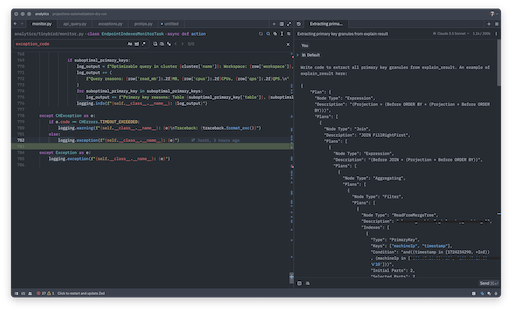
However, this week, I started using Zed.dev together with their AI assistant integration. I’m surprised by the experience and efficiency gains. I still have reservations, but it can be valuable allies in tackling programming challenges and routine tasks.
For example, a few days ago, I was working on a tool that needed to parse ClickHouse explain output1, an easy task requiring recursively transverse all the properties looking for some specific properties.
With a simple prompt, the model wrote a working version.
Write code to extract all primary key granules from explain_result. An example of explain_result here:
{…}
def extract_primary_key_granules(explain_result):
    def traverse(node):
        granules = []
        if isinstance(node, dict):
            if 'Indexes' in node:
                for index in node['Indexes']:
                    if index.get('Type') == 'PrimaryKey':
                        granules.append({
                            'Keys': index.get('Keys', []),
                            'Initial Granules': index.get('Initial Granules', 0),
                            'Selected Granules': index.get('Selected Granules', 0)
                        })
            for value in node.values():
                granules.extend(traverse(value))
        elif isinstance(node, list):
            for item in node:
                granules.extend(traverse(item))
        return granules

    return traverse(explain_result)

# Example usage:
result = extract_primary_key_granules(explain_result)
for granule in result:
    print(f"Keys: {granule['Keys']}")
    print(f"Initial Granules: {granule['Initial Granules']}")
    print(f"Selected Granules: {granule['Selected Granules']}")
    print()
The task was relatively easy and I had to make changes and improve the initial code. Despite that, this saved me at least an hour of back-and-forth writing the function and running some tests to see if it worked as expected!
I started using Zed AI assistant with ChatGPT integration. A day after they released their own integration that I’m now testing together with Anthropic’s Claude model. I’m not even using Google for simple searches anymore.
Footnotes
-
This is how a ClickHouse explain output looks like ↩